Clustering Search Console queries by landing page: finding what each URL actually owns
Grouping Search Console queries by landing page can reveal a URL's real topic footprint, mixed intent, hidden subtopics and opportunities to improve or split coverage.

Farky Rafiq
Founder of ClusterIQ

It is a rare thing for a page to rank for just one keyword. If you have ever exported data from Google Search Console, you have likely seen hundreds or even thousands of individual queries associated with a single URL. Trying to make sense of those rows one by one is a headache, and it makes it incredibly difficult to see what that page actually "owns" in the eyes of a search engine.
By clustering the queries within each landing page, ClusterIQ provides a way to summarise that footprint. This process reveals where a page is successfully serving several related subtopics, where the keyword mapping has become messy, and where valuable opportunities are hiding inside your long-tail data.
Start with query-page data
To get started, you need a dataset that connects performance to specific destinations. This should include:
- The search query;
- The landing page URL;
- Impressions and clicks;
- The date range;
- Market or country context where relevant.
A simple export of keywords alone won't work here, as it cannot tell us which specific URL actually received the traffic and visibility.
Cluster within the page first
A highly effective workflow involves grouping your rows by landing page and then clustering the queries attached to each individual URL. This helps you answer a very practical question: what distinct search needs is this page currently satisfying?
For example, a category page might reveal subclusters for specific brands, sizes, or use cases. A long-form guide might show distinct clusters for definitions, implementation steps, and troubleshooting advice.
The dominant cluster describes current ownership
If you find that 75% of a page's impressions come from one coherent group of queries, you have a very strong signal about that page's primary search role. You can then review the remaining smaller clusters to decide if they represent:
- Legitimate supporting demand that belongs on the page;
- Secondary opportunities you could lean into;
- Misaligned rankings that don't fit the content;
- Evidence that the page is trying to cover too much ground.
Mixed intent can reveal an overloaded page
Sometimes a single URL attracts queries for wildly different intents, such as software pricing, user reviews, how-to guides, and product logins all at once. While one page can occasionally serve multiple tasks, it is often a sign that the page is ranking simply because the site lacks a more specific, relevant destination.
Page-type classification helps ClusterIQ distinguish between a healthy, broad page and one that is simply doing too many jobs poorly.
Worked example: a broad category page
Consider a "bathroom furniture" category page that shows up for 4,000 different queries in Search Console. Clustering that data might reveal:
- 45% vanity unit queries;
- 25% bathroom cabinets;
- 15% wall-hung furniture;
- 10% brand-specific queries;
- 5% miscellaneous long tail.
This breakdown gives you a clear to-do list. The page is clearly a strong parent hub, but some of those subclusters, like "wall-hung furniture", might deserve their own dedicated child category pages. Others might be better served as new filters or internal linking targets.
Compare page clusters with the site-wide topic map
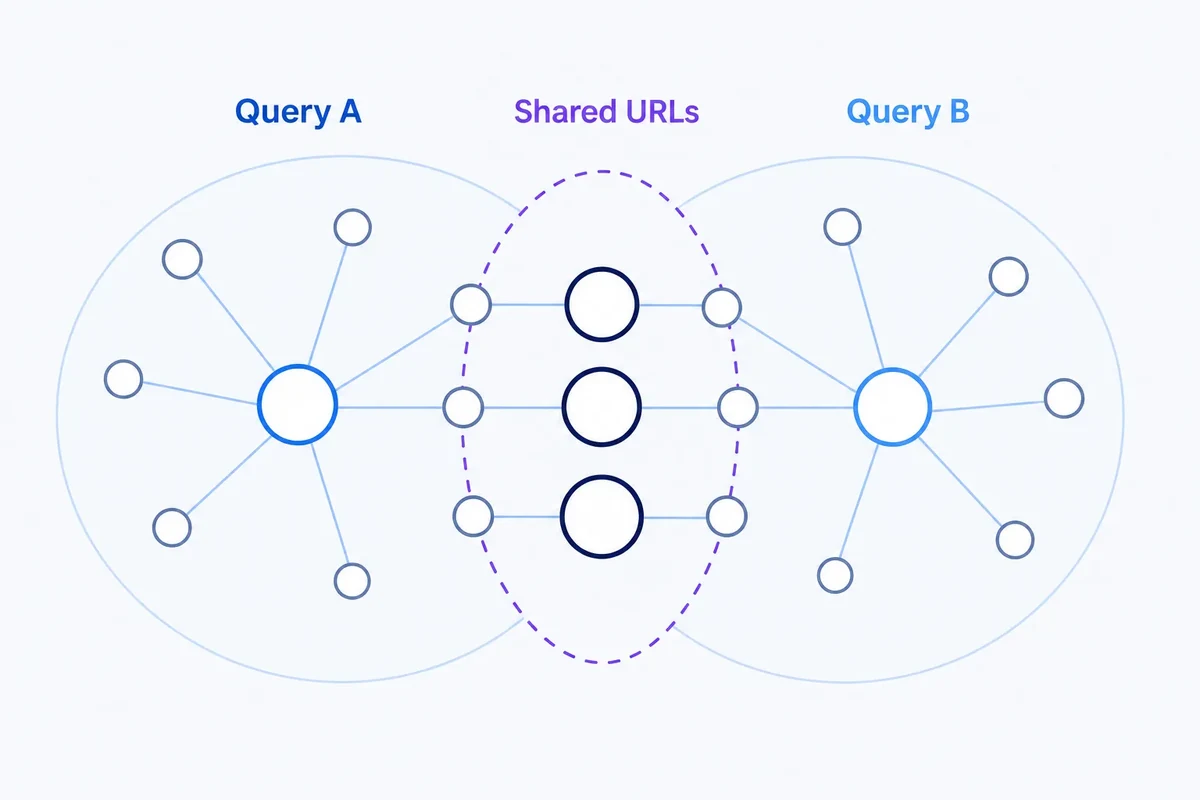
Once you have identified clusters within a page, they should be matched back against the broader ClusterIQ topic graph for the whole site. This helps you spot architectural issues, such as whether a subtopic is already owned by a different URL, if the current page is the rightful "owner", or if you have a genuine case of keyword cannibalisation.
Use performance as context, not the clustering feature
While search volume, impressions, and clicks are vital for prioritising your work, they shouldn't dictate how queries are grouped semantically. It is better to first determine which queries are related by meaning and intent, and then aggregate the performance data across those groups. This prevents a single high-impression query from distorting the actual semantic structure of your content.
Page-level clustering can find content sections
Not every subcluster requires a brand new URL. For a strong informational page, these clusters often suggest ways to improve the existing content. You might find evidence that you need new subheadings, a specific FAQ section, more practical examples, or comparison tables. This allows ClusterIQ to help you squeeze more value out of your current pages without necessarily needing to write new articles from scratch.
Track cluster mix over time
A page's search footprint is rarely static. By monitoring the mix of clusters, you can spot trends before they show up in your total traffic figures. You might notice a specific subtopic is growing in importance, a previously dominant cluster is starting to fade, or a new URL on your site is beginning to compete for the same cluster of terms.
Use the page as a controlled context
Clustering within the confines of a single page is often more accurate than trying to cluster an entire site in one go. Because all the queries already share a relationship with that URL, subtle subtopics are easier to identify. Just remember that the page's current ownership might be imperfect, so always compare these local clusters against your global site model.
Long-tail rows can become meaningful in aggregate
Many Search Console queries have very few impressions on their own. However, when you group them into a coherent long-tail cluster, they represent a meaningful block of demand. ClusterIQ surfaces these groups, giving you a better sense of the total market opportunity without getting bogged down in the noise of individual low-volume rows.
A practical workflow
- Import your query-page data, ensuring you keep the source information.
- Group all queries by their landing page URL.
- Run clustering on each page that has a significant number of queries.
- Label the resulting subclusters and aggregate their performance metrics.
- Compare these findings with your site-wide topic graph.
- Decide whether to keep the page as is, expand it, split it into new pages, or adjust your internal links.
- Monitor how the cluster mix evolves over time.
Practitioner principle: a landing page is not one keyword target. It is a portfolio of search needs that can be analysed as structure.
ClusterIQ Conclusion
Clustering Search Console queries by landing page transforms a messy data export into a strategic map of what your URLs actually achieve. By using ClusterIQ to analyse this structure, you can refine your content, identify missing topics, and fix cannibalisation issues, moving far beyond the outdated idea of one "primary keyword" per page.
Sources and further reading
Farky Rafiq
Founder of ClusterIQ
I've worked in digital marketing since 2005 and founded Liquid Silver in 2011. These articles are where I share the methods, experiments and practical SEO thinking behind ClusterIQ.
Put the idea into practice with your own keyword data
ClusterIQ helps turn raw SEO exports into clean, structured working datasets you can inspect, refine, report on and take into the next stage of your workflow.
Keep reading
A confidence framework for mapping keyword clusters to URLs
From keyword clusters to URL mapping: turning groups into site architecture